Understanding the populate parameter for the REST API
Page summary:The
populateparameter in REST API queries includes additional fields, relations, components, and dynamic zones in responses beyond default attributes. Usepopulate=*for all 1-level-deep relations, or explicitly specify fields with nested arrays and fragment syntax for deeper or selective population.
The content of this page might not be fully up-to-date with Strapi 5 yet:
- All the conceptual information and explanations are correct and up-to-date.
- However, in the examples, the response content might be slightly different.
Examples will be fully up-to-date after the Strapi 5.0.0 (stable version) release and as soon as the FoodAdvisor example application is upgraded to Strapi 5.
However, having slightly different response examples should not prevent you from grasping the essential concepts taught in this page.
When querying content-types with Strapi's REST API, by default, responses only include top-level fields and do not include any relations, media fields, components, or dynamic zones.
Populating in the context of the Strapi REST API means including additional content with your response by returning more fields than the ones returned by default. You use the populate parameter to achieve this.
Throughout this guide, examples are built with real data queried from the server included with the FoodAdvisor example application. To test examples by yourself, setup FoodAdvisor, start the server in the /api/ folder, and ensure that proper find permissions are given for the queried content-types before sending your queries.
The present guide will cover detailed explanations for the following use cases:
- populate all fields and relations, 1 level deep,
- populate some fields and relations, 1 level deep,
- populate some fields and relations, several levels deep,
- populate components,
- populate dynamic zones.
Populating several levels deep is often called "deep populate".
In addition to the various ways of using the populate parameter in your queries, you can also build a custom controller as a workaround to populate creator fields (e.g., createdBy and updatedBy). This is explained in the dedicated How to populate creator fields guide.
Populate all relations and fields, 1 level deep
You can return all relations, media fields, components and dynamic zones with a single query. For relations, this will only work 1 level deep, to prevent performance issues and long response times.
To populate everything 1 level deep, add the populate=* parameter to your query.
The following diagram compares data returned by the FoodAdvisor example application with and without populating everything 1 level deep:
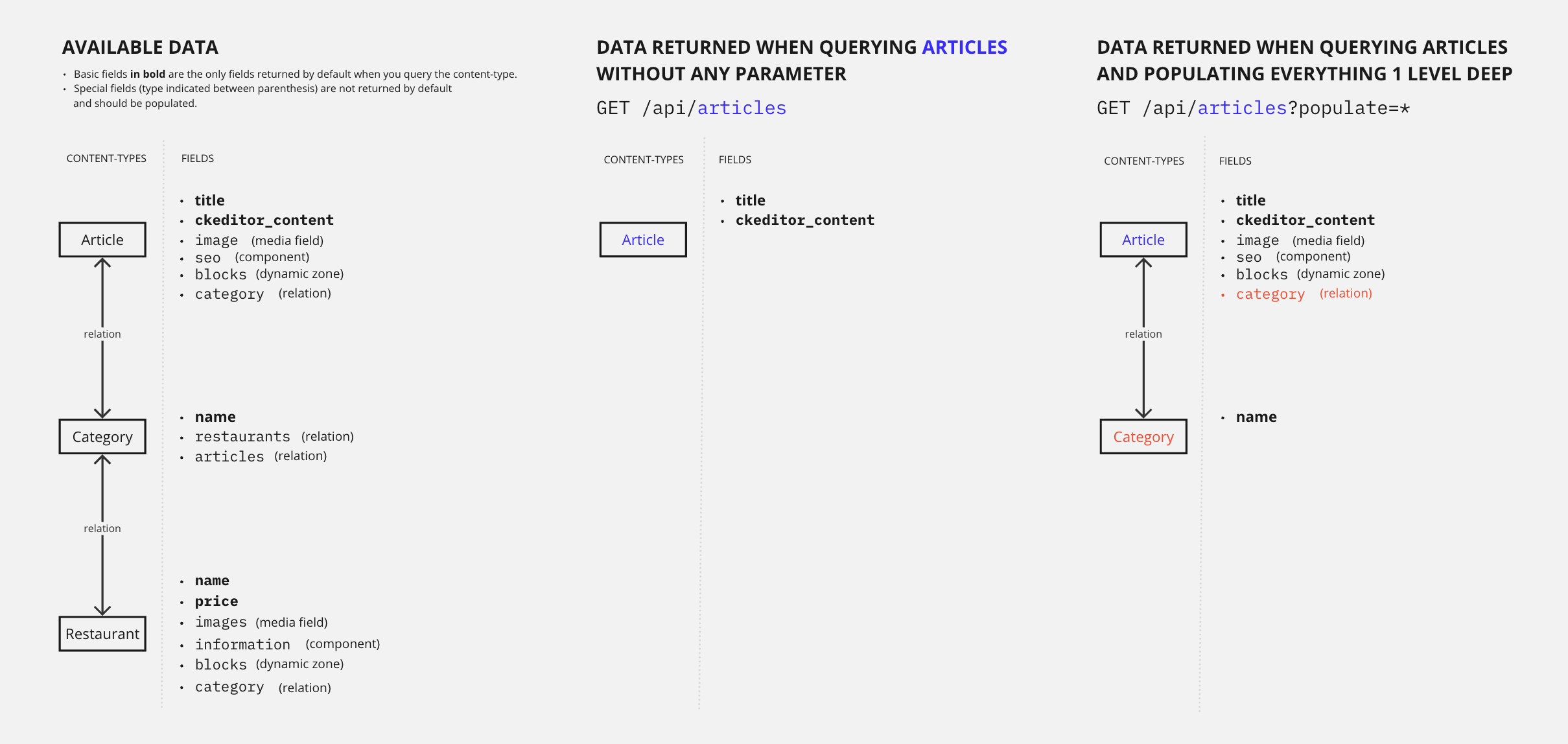
Let's compare and explain what happens with and without this query parameter:
Example: Without populate
Without the populate parameter, a GET request to /api/articles only returns the default attributes and does not return any media fields, relations, components or dynamic zones.
The following example is the full response for all 4 entries from the articles content-types.
Notice how the response only includes the title, slug, createdAt, updatedAt, publishedAt, and locale fields, and the field content of the article as handled by the CKEditor plugin (ckeditor_content, truncated for brevity):
Without populate
Returns only default attributes, without any media fields, relations, components, or dynamic zones.
- cURL
- JavaScript
curl 'http://localhost:1337/api/articles' \
  -H 'Authorization: Bearer <token>'
const response = await fetch(
  'http://localhost:1337/api/articles',
  {
    headers: {
      Authorization: 'Bearer <token>',
    },
  }
);
const data = await response.json();
{
  "data": [
    {
      "id": 1,
      "documentId": "t3q2i3v1z2j7o8p6d0o4xxg",
      "title": "Here's why you have to try basque cuisine, according to a basque chef",
      "slug": "here-s-why-you-have-to-try-basque-cuisine-according-to-a-basque-chef",
      "createdAt": "2021-11-09T13:33:19.948Z",
      "updatedAt": "2023-06-02T10:57:19.584Z",
      "publishedAt": "2022-09-22T09:30:00.208Z",
      "locale": "en",
      "ckeditor_content": "// truncated content"
    },
    {
      "id": 2,
      "documentId": "k2r5l0i9g3u2j3b4p7f0sed",
      "title": "What are chinese hamburgers and why aren't you eating them?",
      "slug": "what-are-chinese-hamburgers-and-why-aren-t-you-eating-them",
      "createdAt": "2021-11-11T13:33:19.948Z",
      "updatedAt": "2023-06-01T14:32:50.984Z",
      "publishedAt": "2022-09-22T12:36:48.312Z",
      "locale": "en",
      "ckeditor_content": "// truncated content"
    },
    {
      "id": 3,
      "documentId": "k6m6l9q0n6v9z2m3i0z5jah",
      "title": "7 Places worth visiting for the food alone",
      "slug": "7-places-worth-visiting-for-the-food-alone",
      "createdAt": "2021-11-12T13:33:19.948Z",
      "updatedAt": "2023-06-02T11:30:00.075Z",
      "publishedAt": "2023-06-02T11:30:00.075Z",
      "locale": "en",
      "ckeditor_content": "// truncated content"
    },
    {
      "id": 4,
      "documentId": "d5m4b6z6g5d9e3v1k9n5gbn",
      "title": "If you don't finish your plate in these countries, you might offend someone",
      "slug": "if-you-don-t-finish-your-plate-in-these-countries-you-might-offend-someone",
      "createdAt": "2021-11-15T13:33:19.948Z",
      "updatedAt": "2023-06-02T10:59:35.148Z",
      "publishedAt": "2022-09-22T12:35:53.899Z",
      "locale": "en",
      "ckeditor_content": "// truncated content"
    }
  ],
  "meta": {
    "pagination": {
      "page": 1,
      "pageSize": 25,
      "pageCount": 1,
      "total": 4
    }
  }
}
Example: With populate=*
With the populate=* parameter, a GET request to /api/articles also returns all media fields, first-level relations, components and dynamic zones.
The following example is the full response for the first of all 4 entries from the articles content-types (the data from articles with ids 2, 3, and 4 is truncated for brevity).
Scroll down to see that the response size is much bigger than without populate. The response now includes additional fields (see highlighted lines) such as:
- the
imagemedia field (which stores all information about the article cover, including all its different formats), - the first-level fields of the
blocksdynamic zone and theseocomponent, - the
categoryrelation and its fields, - and even some information about the articles translated in other languages, as shown by the
localizationsobject.
To populate deeply nested components, see the populate components section.
With populate=*
Returns all media fields, first-level relations, components, and dynamic zones.
- cURL
- JavaScript
curl 'http://localhost:1337/api/articles?populate=*' \
  -H 'Authorization: Bearer <token>'
const response = await fetch(
  'http://localhost:1337/api/articles?populate=*',
  {
    headers: {
      Authorization: 'Bearer <token>',
    },
  }
);
const data = await response.json();
Populate specific relations and fields
You can also populate specific relations and fields, by explicitly defining what to populate. This requires that you know the name of fields and relations to populate.
Relations and fields populated this way can be 1 or several levels deep. The following diagram compares data returned by the FoodAdvisor example application when you populate 1 level deep vs. 2 levels deep:
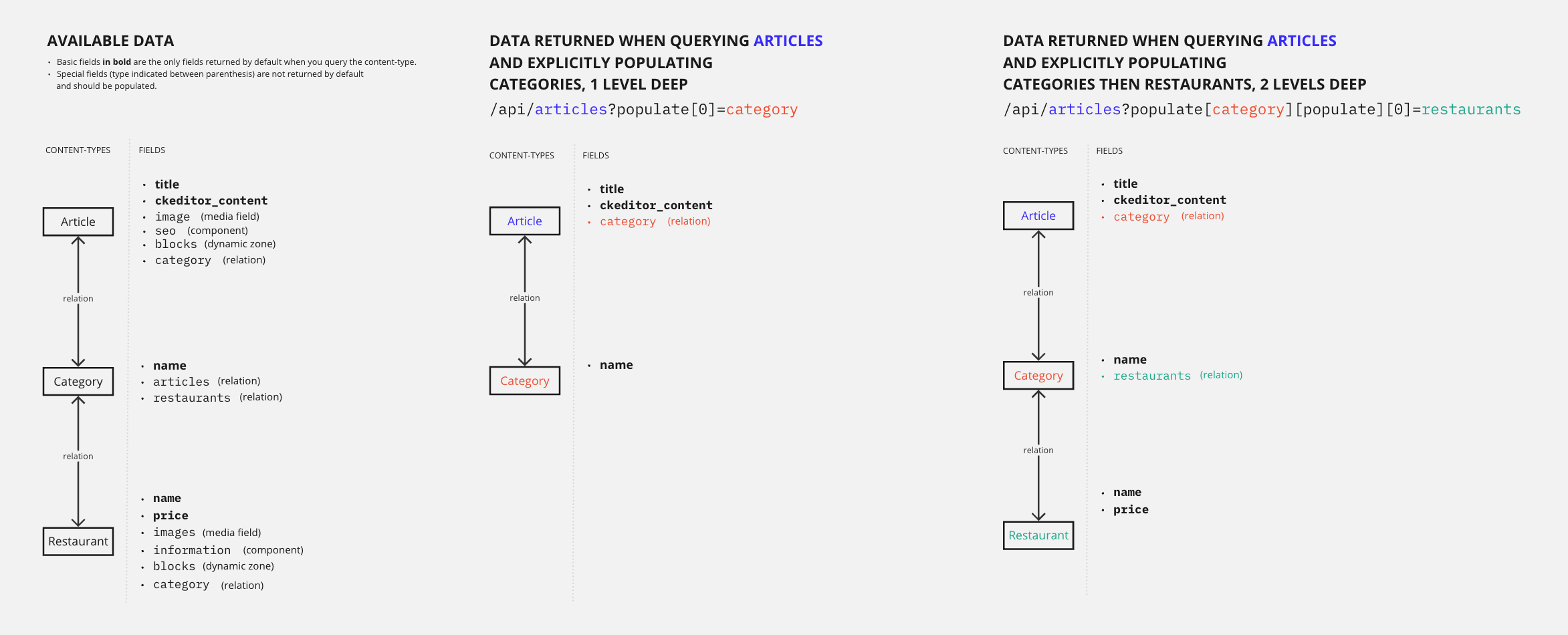
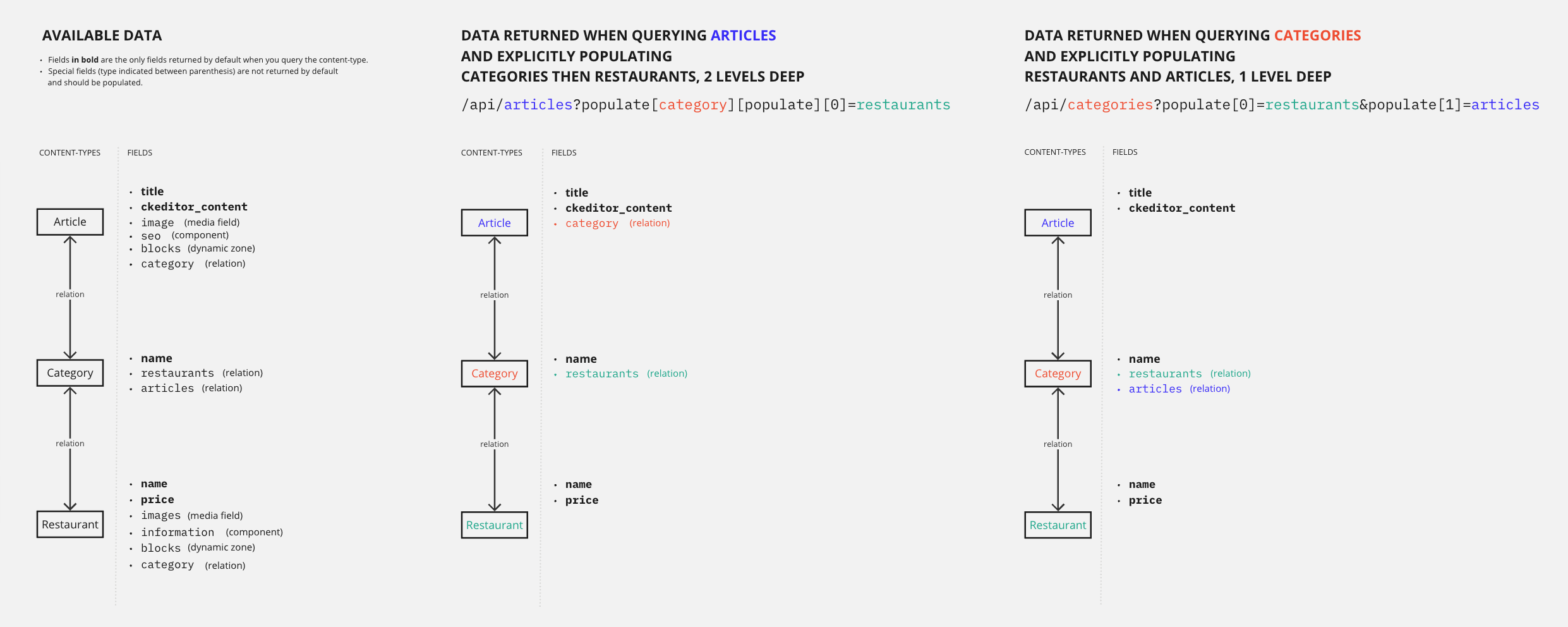
Depending on your content structure, you might get similar data presented in different ways with different queries. For instance, the FoodAdvisor example application includes the article, category, and restaurant content-types that are all in relation to each other in different ways. This means that if you want to get data about the 3 content-types in a single GET request, you have 2 options:
- query articles and populate categories, plus populate the nested relation between categories and restaurants (2 levels deep population)
- query categories and populate both articles and restaurants because categories have a 1st level relation with the 2 other content-types (1 level deep)
The 2 different strategies are illustrated in the following diagram:
Populate as an object vs. populate as an array: Using the interactive query builder
The syntax for advanced query parameters can be quite complex to build manually. We recommend you use our interactive query builder tool to generate the URL.
Using this tool, you will write clean and readable requests in a familiar (JavaScript) format, which should help you understand the differences between different queries and different ways of populating. For instance, populating 2 levels deep implies using populate as an object, while populating several relations 1 level deep implies using populate as an array:
Populate as an object
(to populate 1 relation several levels deep):
{
  populate: {
    category: {
      populate: ['restaurants'],
    },
  },
}
Populate as an array
(to populate many relations 1 level deep)
{
  populate: [
    'articles',
    'restaurants'
  ],
}
Populate 1 level deep for specific relations
You can populate specific relations 1 level deep by using the populate parameter as an array.
Since the REST API uses the LHS bracket notation (i.e., with square brackets []), the parameter syntaxes to populate 1 level deep would look like the following:
| How many relations to populate | Syntax example |
|---|---|
| Only 1 relation | populate[0]=a-relation-name |
| Several relations | populate[0]=relation-name&populate[1]=another-relation-name&populate[2]=yet-another-relation-name |
Let's compare and explain what happens with and without populating relations 1 level deep when sending queries to the FoodAdvisor example application:
Example: Without populate
Without the populate parameter, a GET request to /api/articles only returns the default attributes.
The following example is the full response for all 4 entries from the articles content-type.
Notice that the response does not include any media fields, relations, components or dynamic zones:
Without populate
Returns only default attributes for all articles.
- cURL
- JavaScript
curl 'http://localhost:1337/api/articles' \
  -H 'Authorization: Bearer <token>'
const response = await fetch(
  'http://localhost:1337/api/articles',
  {
    headers: {
      Authorization: 'Bearer <token>',
    },
  }
);
const data = await response.json();
{
  "data": [
    {
      "id": 1,
      "documentId": "x2m0d7d9o4m2z3u2r2l9yes",
      "title": "Here's why you have to try basque cuisine, according to a basque chef",
      "slug": "here-s-why-you-have-to-try-basque-cuisine-according-to-a-basque-chef",
      "createdAt": "2021-11-09T13:33:19.948Z",
      "updatedAt": "2023-06-02T10:57:19.584Z",
      "publishedAt": "2022-09-22T09:30:00.208Z",
      "locale": "en",
      "ckeditor_content": "…"
    },
    {
      "id": 2,
      "documentId": "k6m6l9q0n6v9z2m3i0z5jah",
      "title": "What are chinese hamburgers and why aren't you eating them?",
      "slug": "what-are-chinese-hamburgers-and-why-aren-t-you-eating-them",
      "createdAt": "2021-11-11T13:33:19.948Z",
      "updatedAt": "2023-06-01T14:32:50.984Z",
      "publishedAt": "2022-09-22T12:36:48.312Z",
      "locale": "en",
      "ckeditor_content": "…"
    },
    {
      "id": 3,
      "documentId": "o5d4b0l4p8l4o4k5n1l3rxa",
      "title": "7 Places worth visiting for the food alone",
      "slug": "7-places-worth-visiting-for-the-food-alone",
      "createdAt": "2021-11-12T13:33:19.948Z",
      "updatedAt": "2023-06-02T11:30:00.075Z",
      "publishedAt": "2023-06-02T11:30:00.075Z",
      "locale": "en",
      "ckeditor_content": "…"
    },
    {
      "id": 4,
      "documentId": "t3q2i3v1z2j7o8p6d0o4xxg",
      "title": "If you don't finish your plate in these countries, you might offend someone",
      "slug": "if-you-don-t-finish-your-plate-in-these-countries-you-might-offend-someone",
      "createdAt": "2021-11-15T13:33:19.948Z",
      "updatedAt": "2023-06-02T10:59:35.148Z",
      "publishedAt": "2022-09-22T12:35:53.899Z",
      "locale": "en",
      "ckeditor_content": "…"
    }
  ],
  "meta": {
    "pagination": {
      "page": 1,
      "pageSize": 25,
      "pageCount": 1,
      "total": 4
    }
  }
}
Example: With populate[0]=category
With populate[0]=category added to the request, we explicitly ask to include some information about category, which is a relation field that links the articles and the categories content-types.
The following example is the full response for all 4 entries from the articles content-type.
Notice that the response now includes additional data with the category field for each article (see highlighted lines):
With populate[0]=category
Returns articles with their related category data populated.
- cURL
- JavaScript
curl 'http://localhost:1337/api/articles?populate[0]=category' \
  -H 'Authorization: Bearer <token>'
const response = await fetch(
  'http://localhost:1337/api/articles?populate[0]=category',
  {
    headers: {
      Authorization: 'Bearer <token>',
    },
  }
);
const data = await response.json();
Populate several levels deep for specific relations
You can also populate specific relations several levels deep. For instance, when you populate a relation which itself populates another relation, you are populating 2 levels deep. Populating 2 levels deep is the example covered in this guide.
There is no limit on the number of levels that can be populated. However, the deeper the populates, the more the request will take time to be performed.
Since the REST API uses the LHS bracket notation, (i.e., with square brackets []), for instance if you want to populate a relation nested inside another relation, the parameter syntax would look like the following:
populate[first-level-relation-to-populate][populate][0]=second-level-relation-to-populate
The syntax for advanced query parameters can be quite complex to build manually. We recommend you use our interactive query builder tool to generate the URL. For instance, the /api/articles?populate[category][populate][0]=restaurants URL used in the following examples has been generated by converting the following object using our tool:
{
  populate: {
    category: {
      populate: ['restaurants'],
    },
  },
}
The FoodAdvisor example application includes various levels of relations between content-types. For instance:
- an
articlecontent-type includes a relation with thecategorycontent-type, - but a
categorycan also be assigned to anyrestaurantcontent-type.
With a single GET request to /api/articles and the appropriate populate parameters, you can return information about articles, restaurants, and categories simultaneously.
Let's compare and explain the responses returned with populate[0]=category (1 level deep) and populate[category][populate][0]=restaurants (2 levels deep) when sending queries to FoodAdvisor:
Example: With 1-level deep population
When we only populate 1 level deep, asking for the categories associated to articles, we can get the following example response (highlighted lines show the category relations field):
With 1-level deep population
Populates the category relation 1 level deep.
- cURL
- JavaScript
curl 'http://localhost:1337/api/articles?populate[0]=category' \
  -H 'Authorization: Bearer <token>'
const response = await fetch(
  'http://localhost:1337/api/articles?populate[0]=category',
  {
    headers: {
      Authorization: 'Bearer <token>',
    },
  }
);
const data = await response.json();
Example: With 2-level deep population
When we populate 2 levels deep, asking for the categories associated to articles, but also for restaurants associated to these categories, we can get the following example response.
Notice that we now have the restaurants relation field included with the response inside the category relation (see highlighted lines):
With 2-level deep population
Populates the category relation and the nested restaurants relation 2 levels deep.
- cURL
- JavaScript
curl 'http://localhost:1337/api/articles?populate[category][populate][0]=restaurants' \
  -H 'Authorization: Bearer <token>'
const response = await fetch(
  'http://localhost:1337/api/articles?populate[category][populate][0]=restaurants',
  {
    headers: {
      Authorization: 'Bearer <token>',
    },
  }
);
const data = await response.json();
Populate components
Components and dynamic zones are not included in responses by default and you need to explicitly populate each dynamic zones, components, and their nested components.
Since the REST API uses the LHS bracket notation, (i.e., with square brackets []), you need to pass all elements in a populate array. Nested fields can also be passed, and the parameter syntax could look like the following:
populate[0]=a-first-field&populate[1]=a-second-field&populate[2]=a-third-field&populate[3]=a-third-field.a-nested-field&populate[4]=a-third-field.a-nested-component.a-nested-field-within-the-component
The syntax for advanced query parameters can be quite complex to build manually. We recommend you use our interactive query builder tool to generate the URL. For instance, the /api/articles?populate[0]=seo&populate[1]=seo.metaSocial&populate[2]=seo.metaSocial.image URL used in the following examples has been generated by converting the following object using our tool:
{
  populate: [
    'seoData',
    'seoData.sharedImage',
    'seoData.sharedImage.media',
  ],
},
The FoodAdvisor example application includes various components and even components nested inside other components. For instance:
- an
articlecontent-type includes aseocomponent 1, - the
seocomponent includes a nested, repeatablemetaSocialcomponent 2, - and the
metaSocialcomponent itself has several fields, including animagemedia field 3.
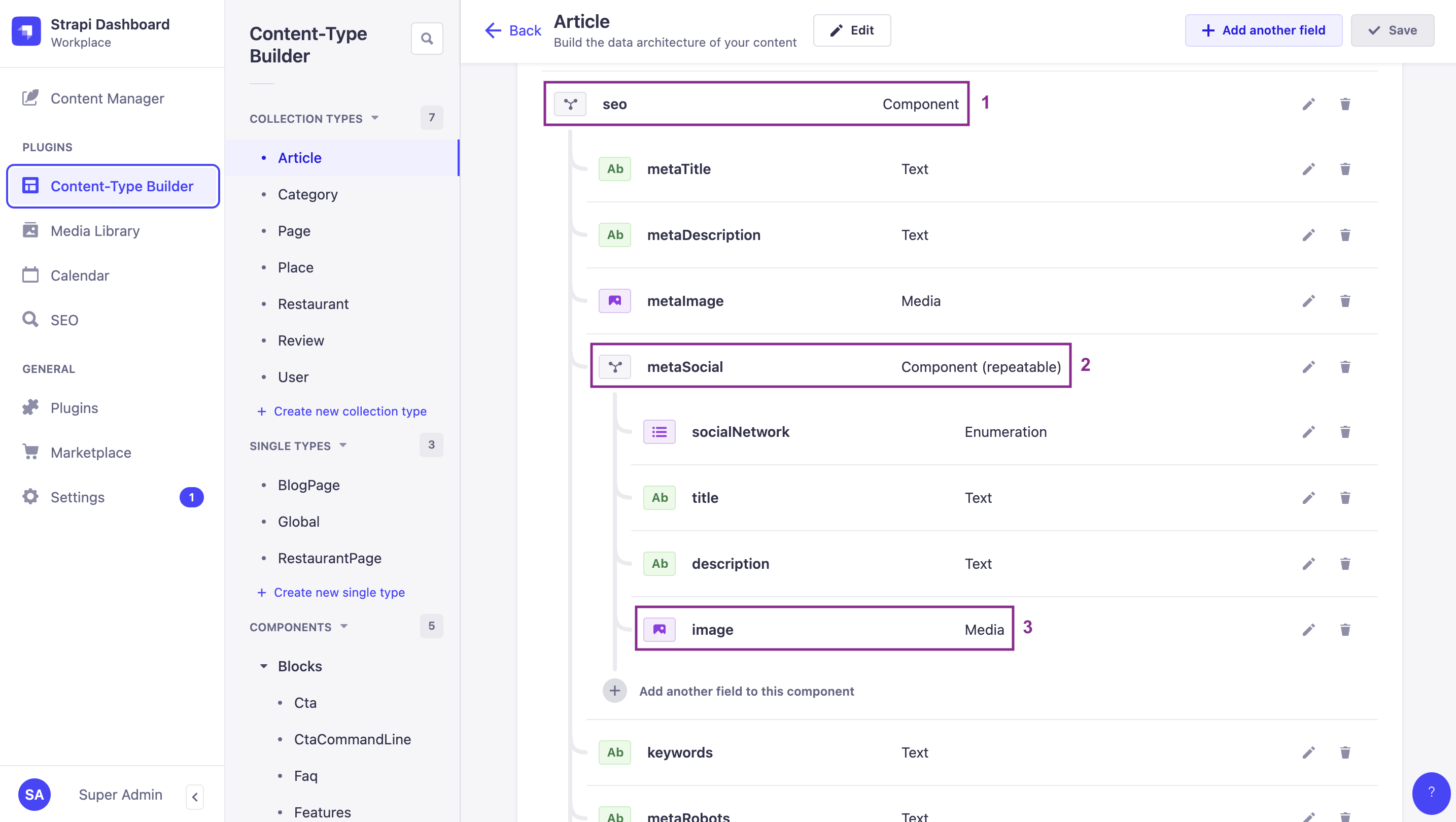
By default, none of these fields or components are included in the response of a GET request to /api/articles. But with the appropriate populate parameters, you can return all of them in a single request.
Let's compare and explain the responses returned with populate[0]=seo (1st level component) and populate[0]=seo&populate[1]=seo.metaSocial (2nd level component nested within the 1st level component):
Example: Only 1st level component
When we only populate the seo component, we go only 1 level deep, and we can get the following example response. Highlighted lines show the seo component.
Notice there's no mention of the metaSocial component nested within the seo component:
Only 1st level component
Populates only the seo component, 1 level deep.
- cURL
- JavaScript
curl 'http://localhost:1337/api/articles?populate[0]=seo' \
  -H 'Authorization: Bearer <token>'
const response = await fetch(
  'http://localhost:1337/api/articles?populate[0]=seo',
  {
    headers: {
      Authorization: 'Bearer <token>',
    },
  }
);
const data = await response.json();
Example: 1st level and 2nd level component
When we populate 2 levels deep, asking both for the seo component and the metaSocial component nested inside seo, we can get the following example response.
Notice that we now have the metaSocial component-related data included with the response (see highlighted lines):
1st level and 2nd level component
Populates the seo component and the nested metaSocial component.
- cURL
- JavaScript
curl 'http://localhost:1337/api/articles?populate[0]=seo&populate[1]=seo.metaSocial' \
  -H 'Authorization: Bearer <token>'
const response = await fetch(
  'http://localhost:1337/api/articles?populate[0]=seo&populate[1]=seo.metaSocial',
  {
    headers: {
      Authorization: 'Bearer <token>',
    },
  }
);
const data = await response.json();
Populate dynamic zones
Dynamic zones are highly dynamic content structures by essence. When querying dynamic zones, standard populate parameters (such as populate[0]=dynamic-zone-name or populate=*) will only fetch the default scalar fields (e.g., strings, numbers, booleans) of the components within the dynamic zone. By default, they will not populate nested relations, media fields, or nested components inside those components.
To retrieve component-specific nested relations, media fields, or components within a dynamic zone, you must define per-component populate queries using the on property (fragment population syntax). This is because different components in a dynamic zone can have completely different structures, and require their own unique nested queries.
For instance, in the FoodAdvisor example application:
- A
blocksdynamic zone exists on thearticlecontent-type 1. - The dynamic zone includes 3 different components:
relatedArticles2,faq3, andCtaCommandLine4. All components have a different content structure containing various fields. - The
relatedArticlescomponent has anarticlesrelation 5 with the article content-type.
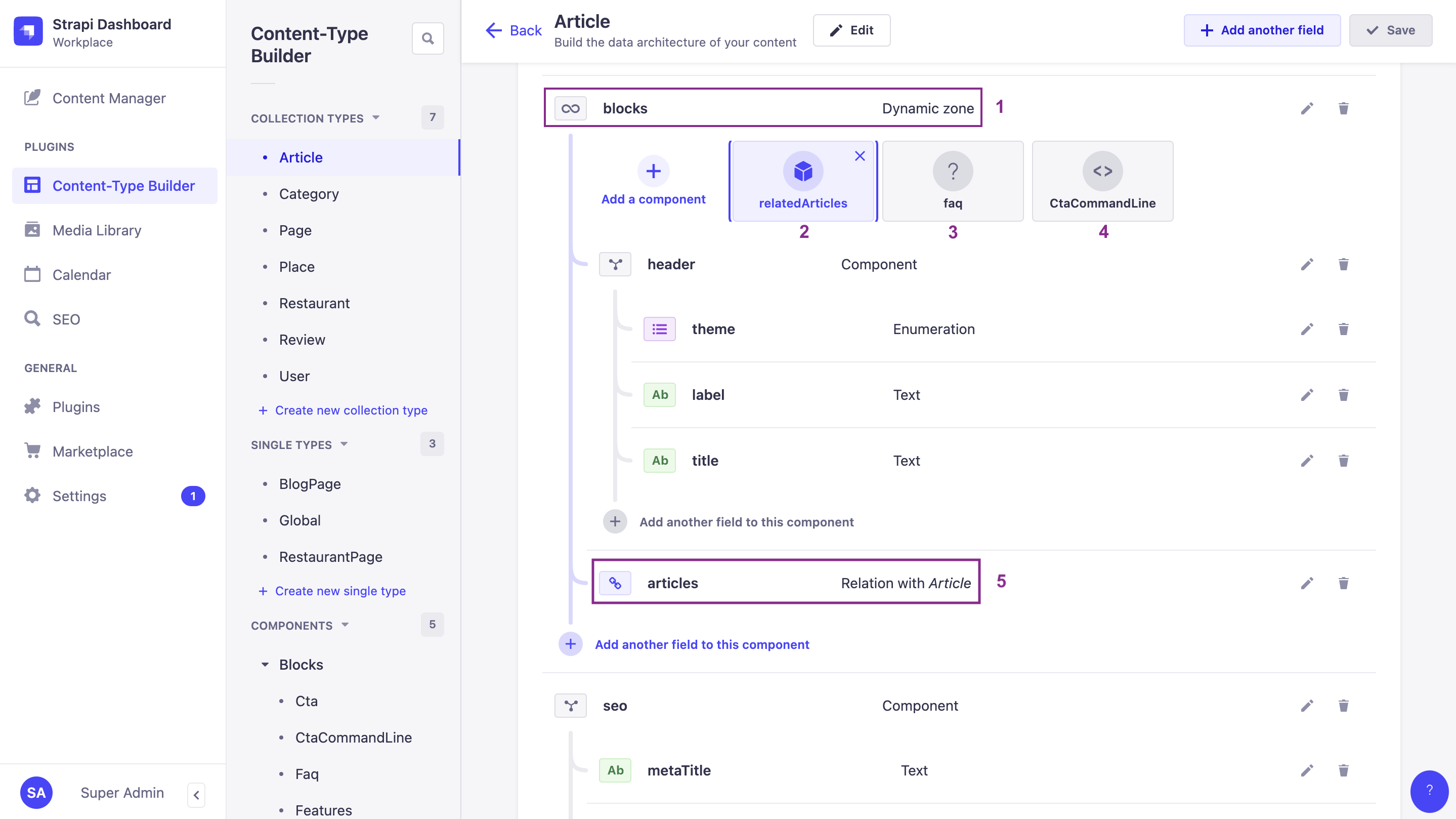
By default, none of the deeply nested fields or relations are included in the response of a GET request to /api/articles. With the appropriate populate parameters and by applying a detailed population strategy using the fragment on property, you can return precisely the data you need.
The syntax for advanced query parameters can be quite complex to build manually. We recommend you use our interactive query builder tool to generate the URL. For instance, the /api/articles?populate[blocks][on][blocks.related-articles][populate][articles][populate][0]=image&populate[blocks][on][blocks.cta-command-line][populate]=* URL used in the following example has been generated by converting the following object using our tool:
{
  populate: {
    blocks: { // asking to populate the blocks dynamic zone
      on: { // using a detailed population strategy to explicitly define what you want
        'blocks.related-articles': {
          populate: {
           'articles': {
             populate: ['image']
           }
         }
        },
        'blocks.cta-command-line': {
          populate: '*'
        }
      },
    },
  },
}
Let's compare and explain the responses returned with some examples of a shared population strategy and a detailed population strategy:
Example
When we populate the blocks dynamic zone, we explicitly define which data to populate.
In the following example response, highlighted lines show that:
-
We deeply populate the
articlesrelation of therelatedArticlescomponent, and even theimagemedia field of the related article using fragment (on) population. -
But because we have only asked to populate everything for the
CtaCommandLinecomponent and have not defined anything for thefaqcomponent, no data from thefaqcomponent is returned.
Detailed population strategy for dynamic zones
Populates the blocks dynamic zone using a detailed per-component population strategy.
- cURL
- JavaScript
curl 'http://localhost:1337/api/articles?populate[blocks][on][blocks.related-articles][populate][articles][populate][0]=image&populate[blocks][on][blocks.cta-command-line][populate]=*' \
  -H 'Authorization: Bearer <token>'
const response = await fetch(
  'http://localhost:1337/api/articles?populate[blocks][on][blocks.related-articles][populate][articles][populate][0]=image&populate[blocks][on][blocks.cta-command-line][populate]=*',
  {
    headers: {
      Authorization: 'Bearer <token>',
    },
  }
);
const data = await response.json();
Using populate=* or deep population plugins can create unpredictable, costly database queries. In production, always populate explicitly and limit depth to 2-3 levels. Consider using route-level middlewares to centralize population logic. See Building High-Performance Strapi Applications on the Strapi blog.